What is Beam2Present?
With Beam2Present you can show your computer screen to anyone online in real-time. Everything you see, your guests can also see – in true color
quality.
Where to use Beam2Present?
| • |
Sales. Show your computer screen to customers and prospects. You can show any presentation, any document, and any application.
|
| • |
Consulting. Advise clients over the Internet. Save time and travel costs and enhance the quality of tele-consulting significantly.
|
Why is Beam2Present different?
| • |
Participants use state-of-the-art HTML technology
Participants only need a standard Internet browser and an Internet connection. Beam2Present does NOT require any installation, download, connection
program, ActiveX, Java, Flash and the participant will not see any security warning.
|
| • |
Show what you want
You can show any document, any presentation, any application. Beam2Present transmits your entire screen content. With other online presentation
tools you can only show PowerPoint slides - and in many cases even without animation. With Beam2Present you can show anything you want - in
real-time.
|
| • |
Cost-effective flat-fee pricing
With Beam2Present you're in control. No per minute fees! You pay a low monthly flat fee and you can host as many session as you want.
|

Applications
With our proprietary desktop sharing technology guests can view the screen of the host user live over the Internet. Any application, document, design or
presentation can be evaluated in real time. Guests connect instantly using their standard Internet browser. There's no download, no installation, no security
warning, no ActiveX, no Java, no Flash.
| Sales |
Beam2Present is perfect for sales representatives, who want to conduct live product demonstrations or give presentations to prospective customers.
Enhance your telephone conversation and show your prospects what you see on your computer. Show presentation slides or demo products online and in
real-time. Beam2Present is suitable for ad-hoc presentations - you don't have to upload any content and participants don't have to prepare anything.
There's no download, no installation, no security warning - a standard Internet browser and an Internet connection is enough. Beam2Present works
without Java, without Flash, without ActiveX.
|
| Consulting |
Without Beam2Present, giving advice over the phone is difficult because you cannot show anything. On-site consulting, however, is time-consuming and
costly. Beam2Present solves this problem and gives you the possibility to advise customers and prospects on the phone while showing them your
computer screen online at the same time. with Beam2Present you can provide tele-consulting that is comparable with on-site consulting, but
significantly more cost-effective and less time-consuming. You don't waste time travelling, but focus on what's really important: your advice.
|
Product
Incredibly fast, unbelievably easy, and completely secure
Beam2Present is a simple, fast, and easy-to-use desktop sharing software program that significantly improves everyday communication. Use Beam2Present to
present, demonstrate, advise and collaborate. Our proprietary technology enables customers, prospects and coworkers to view any application running on your
computer in real time. Everything you see, your guests can also see.
Key Differentiators
|
• |
Beam2Present is very easy to use. It just takes one clicks to start a session. No need to upload any content prior to a meeting - screen
contents are transmitted in real time directly from your computer.
|
|
• |
Beam2Present is cost-effective: We offer flat fee pricing. You can host as many online sessions as you want. Meet more often while at the
same time saving on travel time and expenses.
|
|
• |
Beam2Present is completely secure. Industry-standard security features ensure data security and hence confidentiality of your session
information.
|
Key Benefits
|
1. |
Increase productivity by adding Beam2Present to everyday communication.
|
|
2. |
Reduce costs associated with customer acquisition.
|
|
3. |
Increase sales by enhancing interaction with customers and prospects.
|

How it works
2-Step-Simplicity™! We believe there is no easier way in the world to start and join an online session. After you register for a free trial or buy a
license, download and install the Beam2Present software. All this is done in less than 2 minutes. Then start your first session:
Quick reference for presenters: How to start a session.
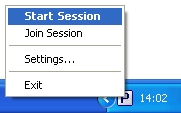
1. Click the

icon in your system tray
in the lower right corner of your computer screen next to your computer's clock and choose
Start Session.
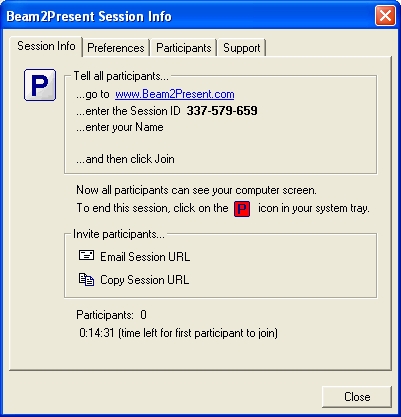
2. You will get a random 9-digit
Session ID from the server a few seconds later.
Quick reference for participants: How to join a session.
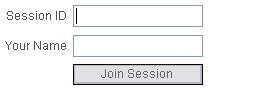
1. Ask your guest to go to
www.Beam2Present.com and click
Join Session.
2. Your guest enters the 9-digit
Session ID and his/her name. The connection is established and you beam your screen!
The user guide explains step by step how to use Beam2Present. All features are described with screen shots and short explanations.
Features
| Feature |
Capability & Benefit |
| Screen Sharing |
Show your screen to anyone over the Internet – instantly. Show any document, presentation, or application in real-time.
|
One-Click-Start.
No Upload. |
Start a session with just one click. No confusing setup. No upload. Beam2Present is so easy to use – you won’t need ANY training.
|
| Intuitive User Interface |
Beam2Present was designed with simplicity and ease-of-use in mind. No training is required. Start your first online presentation in seconds and
become an expert in minutes!
|
| One2Many |
You can invite multiple guests to your sessions. We offer two packages: (1:1) and (1:5). Guests always connect for free using their standard
Internet browser.
|
| Pause Transmission |
You can pause the transmission at any time during an ongoing session to browse through confidential files or check your emails.
|
No Download.
No Installation. |
Your guests don’t download or install any software. Guests use their standard Internet browser to view your desktop.
|
| Custom Session Login |
Add a few lines of HTML code on your web site and guests can connect to your sessions through your own web site. You don’t have to send them
to Beam2Present. Integrate seamlessly with your existing web site and business processes.
|
| Zoom Screen |
Don’t worry about your guests’ screen resolution. The image size is automatically adjusted to the guest's screen resolution. No more
scrolling!
|
| True Color Quality |
You want to show photos, illustrations, diagrams as they appear on your screen? Yes, we transmit images in true color quality.
|
| Usage Reports |
Access detailed session statistics in My Account. Track when your guests join and leave sessions and improve the effectiveness of your online
sessions.
|
| Participant List |
Guests enter their name when they join a session. Every participant can see a list of all connected guests.
|
Technology
| Feature |
Capability & Benefit |
| HTML Technology |
Participants only need an Internet browser and an Internet connection. There's no download, no installation, no software. Beam2Present uses
state-of-the-art HTML technology to display dynamic screen contents. Beam2Present works without Java, without Flash and without ActiveX.
|
| Anytime, Anywhere |
Your guests just open their Internet browser and click Join Session. Our intelligent system automatically detects the best connection possibility
and ensures that every guest connects easily and securely. No complicated connection options. No software installation required.
|
| Industry-Leading Security |
Beam2Present uses advanced secure communication architecture with 256-bit AES and 128-bit SSL encryption. Beam2Present is a managed service and
completely secure.
|
| Firewall Friendly |
You can use Beam2Present with your company's existing network and security settings, proxy servers and firewalls. No need to change or configure
firewall ports that could potentially compromise security.
|
| Incredibly Fast |
Beam2Present has developed patent-pending proprietary bandwidth-adaptive compression technology. It is possible to host or join a meeting even with
a low bandwidth connection. Beam2Present is much faster than complex web conferencing products.
|
| Highest Reliability and Availability |
Beam2Present provides the highest possible level of reliability and availability. This way you know you can meet your guests anytime and anywhere
you choose to.
|
| Globally Distributed Server System |
Beam2Present operates a globally distributed server system to provide the same level of performance wherever you are and whoever you meet online.
Our intelligent routing system selects the optimal communication server for your session.
|
Security
| Feature |
Capability & Benefit |
| End-To-End Encryption |
Beam2Present technology is completely secure. Your session information transmitted between computers is compressed and encrypted using 256-bit AES
and 128-bit SSL encryption to ensure that your sessions are always secure.
|
| User Authentication |
Sessions can only be started with a unique user name and password. For each session, we generate a unique random 9-digit session ID that all guests
are required to enter.
|
| Optional Session Password |
The session organizer is able to specify a unique session password that is only shared with authorized attendees.
|
| Session Privacy |
You can hide your toolbar, desktop wallpaper, links and files on your desktop for additional privacy.
|
| Lock Session |
You can lock a session when all guests are connected. No further guests can join after you locked the session.
|
| Disconnect Guests |
You can see a list of all connected guests and disconnect guests individually. You start a session with your entire team and then you want to
continue with just one of your co-workers – no need to wait for guests to leave, just disconnect them!
|

Pricing
We offer inexpensive leasing contracts. You can host an unlimited number of sessions for any duration of time for one low flat fee. Your guests
always connect for free.
Before you purchase Beam2Present, you should select a product version and a license type and determine the optimal number of licenses. The following
explanations will help you make a decision:
Product Versions
We offer two different product versions: (1:1) and (1:5).
The product versions differ in the maximum number of participants per session. With the (1:1) version you can invite exactly one person to join your
session, with the (1:5) version you can invite up to 5 participants to join your session. Both product versions include the same set of features.
License Types
We offer two different license types: single-user-license and shared-user-license.
A user needs a single-user-license in order to start a session. With a single-user-license, you can install the Beam2Present software on one
desktop and one notebook computer. Several users either need individual single-user-licenses or a shared-user-license.
With a shared-user-license you can install Beam2Present on up to 10 computers within your company and several users can use the Beam2Present
software, but only one session at a time. If you want to start several sessions at the same time, you need additional shared-user-licenses.
If you decide to buy single-user-licenses, each user will get their own user name. If you decide to buy a shared-user-license, you get one user name
that is shared among several people.
Price List
| |
| 1:1 |
€ 30 per month |
€ 60 per month |
| 1:5 |
€ 35 per month |
€ 70 per month |
All prices are per month. We offer 1-year and 2-year leasing contracts. The fees are prepaid in advance for the entire contract period. You can save
20% with a 2-year contract. The leasing contract includes hosting, support and updates. The setup fee is € 50 per license. Leasing contracts
renew automatically. The notice period for cancellation is three months before the end of the contract period.
|
 Biuro Rachunkowe COMMERCIAL
rachunkowość informatyka
Biuro Rachunkowe COMMERCIAL
rachunkowość informatyka